一、Win10访问共享出现以下错误,解决办法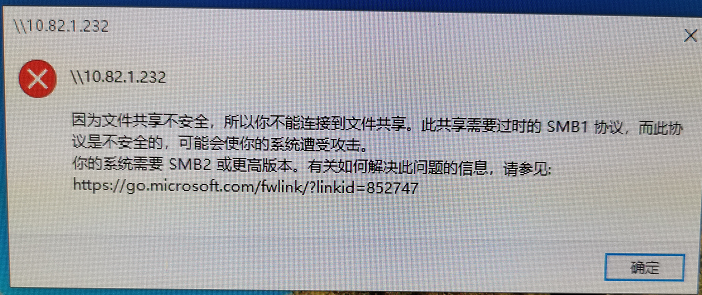
二、解决办法
1、在Windows10桌面,依次点击“开始/Windows系统/控制面板”菜单项。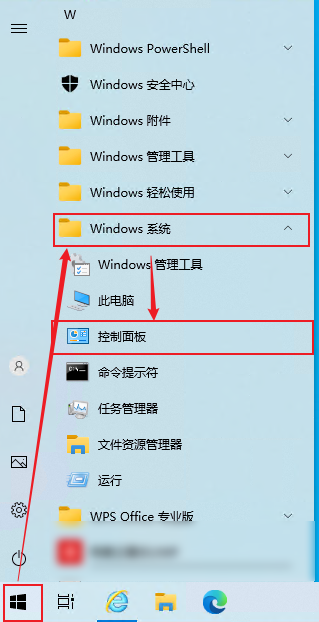
2、在打开的Windows控制面板窗口中,点击“程序”图标。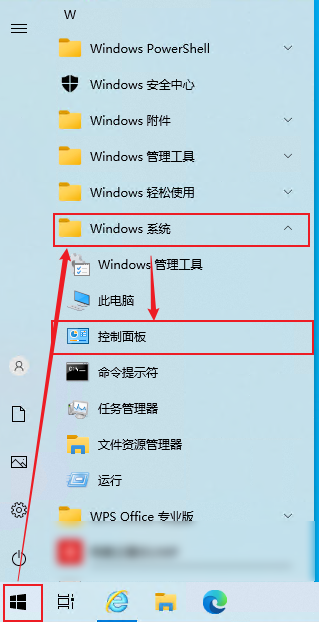
3、在打开的程序和功能窗口中,点击“启用或关闭Windows功能”。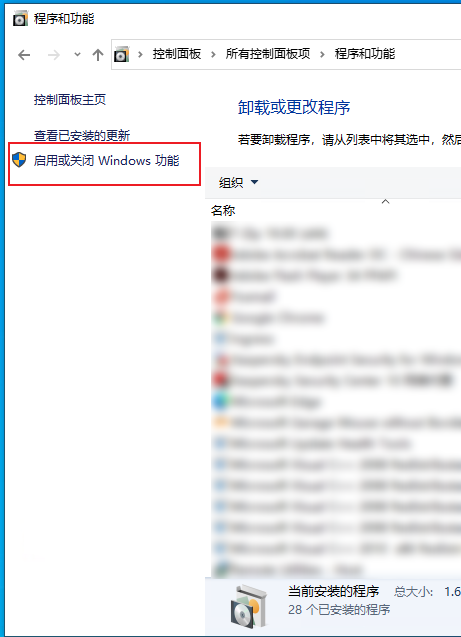
4、在打开的启用或关闭Windows功能窗口中,勾选“Smb1.0/cifs文件共享支持”前面的复选框,最后点击确定按钮即可。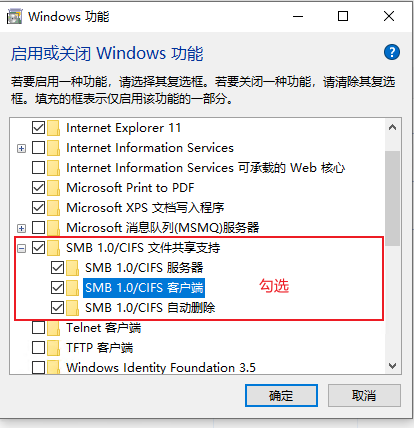
5、重启电脑再尝试访问共享
一、Win10访问共享出现以下错误,解决办法
二、解决办法
1、在Windows10桌面,依次点击“开始/Windows系统/控制面板”菜单项。
2、在打开的Windows控制面板窗口中,点击“程序”图标。
3、在打开的程序和功能窗口中,点击“启用或关闭Windows功能”。
4、在打开的启用或关闭Windows功能窗口中,勾选“Smb1.0/cifs文件共享支持”前面的复选框,最后点击确定按钮即可。
5、重启电脑再尝试访问共享
Loading...